2026-10-20
Capillaries: security
The two most common questions IT managers ask are:
- does it scale?
- is it secure?
We've been trying to address the first question in our series of "scalability updates" posts. Now, let's turn to security.
The diagram below shows the major components of a Capillaries deployment and the data flows between them. Capillaries provides some security measures for the communication channels and components marked in gray.

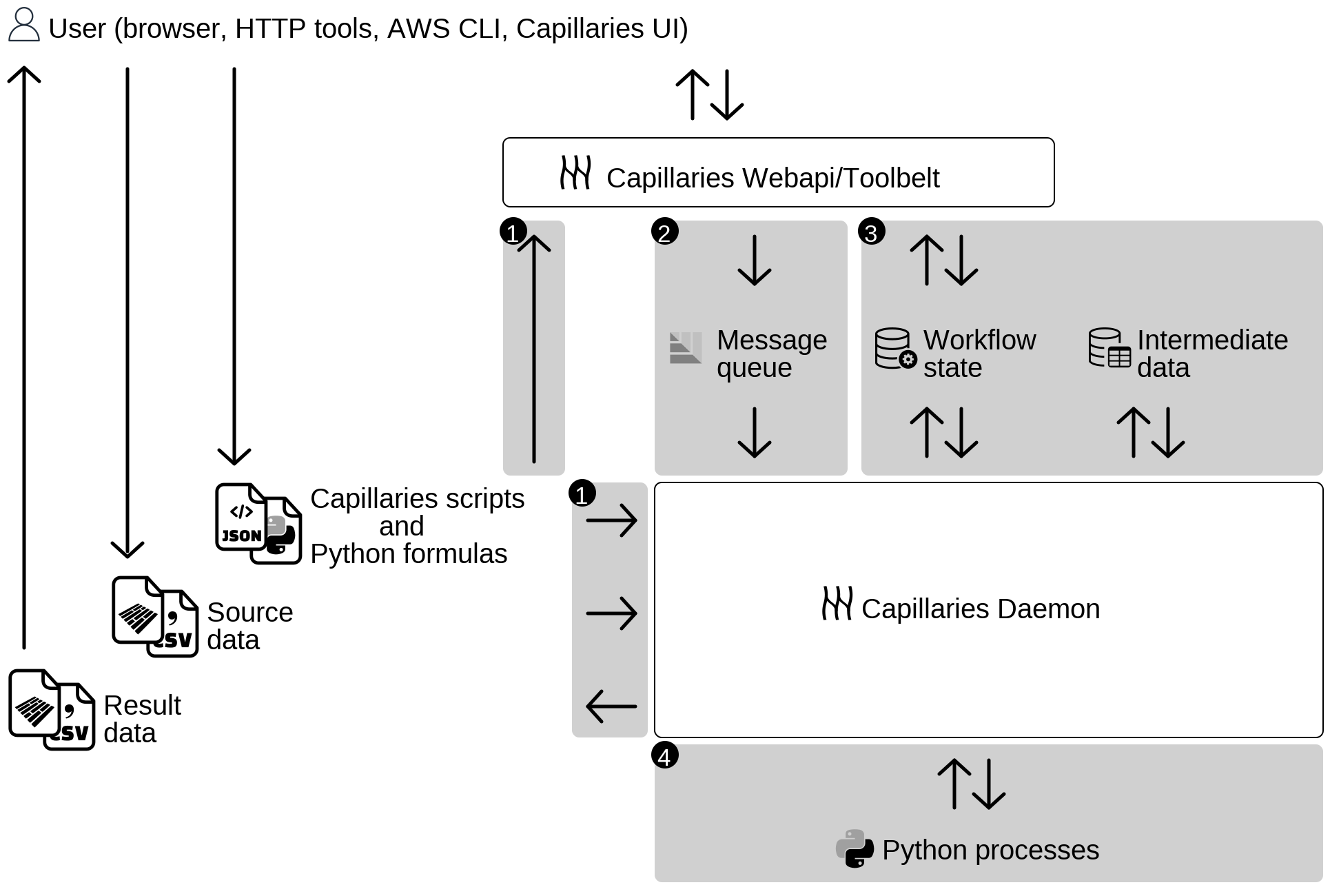
1: Access to Capillaries scripts, Python formulas and data files
Capillaries components access scripts, Python formulas and data files via S3, HTTPS, SFTP, NFS protocols. Deployment engineers can:
- specify the list of allowed protocols
- allow or prohibit access to hosts on private networks
- specify allowed file URL prefixes
These policies help mitigate SSRF (Server-Side Request Forgery) attacks, in which bad actors replace URLs of script files in messages delivered through the message queue, or URLs of data and Python files referenced in the scripts.
NOTE: Yes, there is a data flow arrow from scripts to Webapi. When starting a run, Webapi/Toolbelt reads the supplied Capillaries script before sending its URL in messages. This is mostly about failing early if something is wrong with the script, so users don't have to troubleshoot Daemons that try to process data according to it.
Sample configuration for a Capillaries binary:
"access_policy": {
  "allowed_schemes": ["file", "http", "https", "s3"],
  "allow_private_hosts": true,
  "input_paths": [
    "/var/lib/capillaries/capi_in/",
    "file:///var/lib/capillaries/capi_cfg/",
    "https://raw.githubusercontent.com/capillariesio/capillaries/",
    "s3://capillaries-testbucket/capi_in/",
    "s3://capillaries-testbucket/capi_cfg/"
  ],
  "output_paths": [
    "/var/lib/capillaries/capi_out/",
    "s3://capillaries-testbucket/capi_out/"
  ]
}
2: Message queue protection
Webapi/Toolbelt can sign messages before sending them to the message broker. Daemons reject messages with invalid signatures.
Signing helps mitigate the risk of bad actors gaining access to the AMQP 1.0 message broker and sending messages that point to malicious Capillaries script JSON files. As of this writing (Oct 2026), Capillaries implements Ed25519 digital signatures, which provide strong cryptographic security with small keys and fast performance.
Here is an example:
A signed message envelope with a base64-encoded message body:
{
  "v":1,
  "alg":"Ed25519",
  "kid":"dummy-key-do-not-use-in-production-see-msgsig-test-go-for-details",
  "payload":"eyJ0cyI6MTc5MDIwOTg0NzAzNCwiaWQiOiIwMDAwMDAtYzFkOWNjYjAtMjAwNC00NjkyLTgyOWYtOGY1NjQ4ODNkNTk2Iiwic2NyaXB0X3VybCI6Ii90bXAvY2FwaV9jZmcvbG9va3VwX3F1aWNrdGVzdC9zY3JpcHRfcXVpY2sueWFtbCIsInNjcmlwdF9wYXJhbXNfdXJsIjoiL3RtcC9jYXBpX2NmZy9sb29rdXBfcXVpY2t0ZXN0L3NjcmlwdF9wYXJhbXNfcXVpY2tfZnNfb25lLnlhbWwiLCJrcyI6Imxvb2t1cF9xdWlja3Rlc3RfbG9jYWxfZnNfb25lIiwicnVuX2lkIjoxLCJ0YXJnZXRfbm9kZSI6ImZpbGVfb3JkZXJfZGF0ZV92YWx1ZV9ncm91cGVkX2xlZnRfb3V0ZXIiLCJmaXJzdF90b2tlbiI6LTkyMjMzNzIwMzY4NTQ3NzU4MDgsImxhc3RfdG9rZW4iOjkyMjMzNzIwMzY4NTQ3NzU4MDcsImJhdGNoX2lkeCI6MCwiYmF0Y2hlc190b3RhbCI6MX0=",
  "sig":"KYo5OlOhNidtAYvdqpU56KRziTrSx+tAusYSh3zyJ041FwsV9myXMNQxjUDMZ88vHJHTU8+qw1FDWOC2EfIhAQ=="
}
The base64-encoded part, decoded: the signed Capillaries message.
{
  "ts":1790209847034,
  "id":"000000-c1d9ccb0-2004-4692-829f-8f564883d596",
  "script_url":"/tmp/capi_cfg/lookup_quicktest/script_quick.yaml",
  "script_params_url":"/tmp/capi_cfg/lookup_quicktest/script_params_quick_fs_one.yaml",
  "ks":"lookup_quicktest_local_fs_one",
  "run_id":1,
  "target_node":"file_order_date_value_grouped_left_outer",
  "first_token":-9223372036854775808,
  "last_token":9223372036854775807,
  "batch_idx":0,
  "batches_total":1
}
NOTE: Yes, dummy-key-do-not-use-in-production-see-msgsig-test-go-for-details is the actual key ID used in the sample deployment. And yes, do not use this key in production. The msgsig.test.go test can generate a new key pair whenever you need one.
Sample Webapi (message sender) configuration:
"webapi": {
  "message_sign": {
    "active_kid": "dummy-key-do-not-use-in-production-see-msgsig-test-go-for-details",
    "private_key": "..."
  }, ...
}
Sample Daemon (message processor) configuration:
"daemon": {
  "message_verify": {
    "mode": "require",
    "public_keys": {"dummy-key-do-not-use-in-production-see-msgsig-test-go-for-details": "..."}
  }, ...
}
Capillaries uses Azure AMQP 1.0 library to access message brokers. The library supports username/password authentication and TLS connections. Sample connection string:
"amqp10": {
  "url": "amqps://someusername:somepassword@somehost:5671",
  ...
}
3: Access to Cassandra
Capillaries does not provide any custom security measures for Cassandra beyond those offered by the gocql. See the gocql.SslOptions type for details.
Here's a sample configuration for a secure connection to Amazon Keyspaces:
"cassandra": {
"hosts": [ "cassandra.us-east-1.amazonaws.com" ],
"port": 9042,
"username": "
4: Python formulas
Capillaries executes Python scripts containing formulas. It would be nice to have some protection against a situation where bad actors manage to supply malicious Python scripts to a Daemon, which then executes them on the virtual machine or inside the Docker container.
One option is to use a process isolation tool. Below is a fragment of a Daemon configuration that wraps the Python process with nsjail:
"custom_processors": {
  "py_calc": {
    "python_interpreter_path": "/usr/local/bin/nsjail",
    "python_interpreter_params": [
      "-Mo",
      "--chroot", "/",
      "--user", "99999",
      "--group", "99999",
      "-R", "/usr",
      "-R", "/lib",
      "-R", "/lib64",
      "-R", "/bin",
      "-R", "/sbin",
      "--", "/usr/local/bin/python3", "-u", "-"
    ]
  }, ...
}
What about Webapi security?
As of this writing (Oct 2026), the short answer is: there isn't any built-in Webapi security, and none is planned.
Bad actors who gain access to an unprotected Webapi can send messages containing references to malicious scripts, data files, and Python files.
Deployment engineers are encouraged to use whatever tools they have at their disposal to secure Webapi - for example, NGINX + oauth2-proxy for SSO, IP whitelisting, a VPN, etc.
These are deployment-level security measures, not features provided by Capillaries itself. It is up to the deployment engineers to configure and maintain them, ensuring that only authorized users and systems can access Webapi.